
Phillips Hue Bridge
I was practicing my Wireshark analysis skills when i came across my Phillips Hue bridge in the capture. I noticed that it had an http endpoint that I had never seen or used. The index.html page lists all of the open source software that the hue bridge uses with links to the GitHub pages for each.
Then looking deeper into the pcap, I noticed the description.xml endpoint. When I went to this endpoint, I was an information about the device.
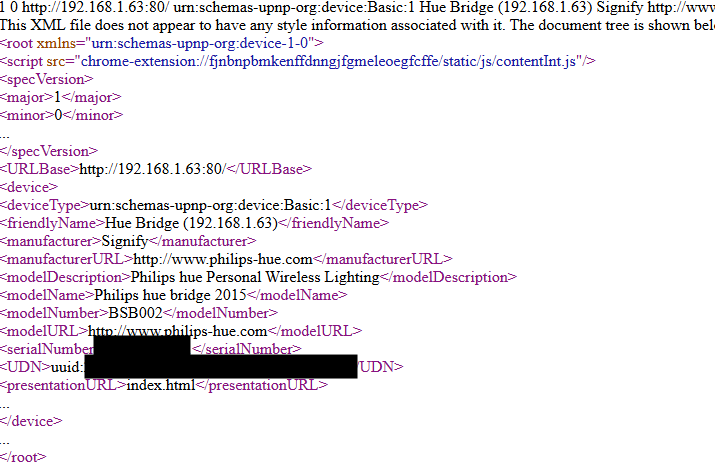
I had the idea then to check for API endpoints. The /api endpoint did not allow GET requests. Then i looked to see if i could find any documentation for the REST API. I found out that you have to push the button on the Hue bridge and then send a request within 20 seconds. This is what the process for adding the bridge to different applications. Each application gets a username that it then uses to send requests to the different endpoints that perform different functions, such as turning on and off the lights. So I prepared the following request and pushed the Hue bridge button before sending it.
curl -X POST http://192.168.1.63/api -H "Content-Type: application/json" -d '{"devicetype":"testing"}'I received the following response.
[{"success":{"username":"6Z6yeXFzRcZSYwH2g7l2qVe9xRKqR6g4XiBdXRJu"}}]Then I hit the /lights endpoint to get a list of lights using the following command.
curl http://192.168.1.63/api/6Z6yeXFzRcZSYwH2g7l2qVe9xRKqR6g4XiBdXRJu/lights The response on the PowerShell terminal was not very readable so I used the following winget command to download and install jq, a command-line JSON processor.
PS C:\Users\james> winget install jqlang.jq
Found jq [jqlang.jq] Version 1.8.1
This application is licensed to you by its owner.
Microsoft is not responsible for, nor does it grant any licenses to, third-party packages.
Downloading https://github.com/jqlang/jq/releases/download/jq-1.8.1/jq-windows-amd64.exe
  ██████████████████████████████  1002 KB / 1002 KB
Successfully verified installer hash
Starting package install...
Path environment variable modified; restart your shell to use the new value.
Command line alias added: "jq"
Successfully installed
Then I used piped the lights endpoint request to jq to better format it and received a response that listed all of the Hue lights and information about them. I have included only one for brevity.
{
  "5": {
    "state": {
      "on": true,
      "bri": 254,
      "hue": 8417,
      "sat": 140,
      "effect": "none",
      "xy": [
        0.1900,
        0.0600
      ],
      "ct": 366,
      "alert": "select",
      "colormode": "ct",
      "mode": "homeautomation",
      "reachable": true
    },
    "swupdate": {
      "state": "noupdates",
      "lastinstall": "2025-07-21T18:53:24"
    },
    "type": "Extended color light",
    "name": "Kids 1",
    "modelid": "LCA007",
    "manufacturername": "Signify Netherlands B.V.",
    "productname": "Hue color lamp",
    "capabilities": {
      "certified": true,
      "control": {
        "mindimlevel": 200,
        "maxlumen": 1100,
        "colorgamuttype": "C",
        "colorgamut": [
          [
            0.6915,
            0.3083
          ],
          [
            0.1700,
            0.7000
          ],
          [
            0.1532,
            0.0475
          ]
        ],
        "ct": {
          "min": 153,
          "max": 500
        }
      },
      "streaming": {
        "renderer": true,
        "proxy": true
      }
    },
    "config": {
      "archetype": "sultanbulb",
      "function": "mixed",
      "direction": "omnidirectional",
      "startup": {
        "mode": "safety",
        "configured": true
      }
    },
    "uniqueid": "00:17:88:01:0d:b4:76:32-0b",
    "swversion": "1.122.8",
    "swconfigid": "D11C1AA7",
    "productid": "Philips-LCA007-1-A19HECLv1"
  },
Then I went a little bit deeper with the following command to hit the /state endpoint for that light.
curl http://192.168.1.63/api/6Z6yeXFzRcZSYwH2g7l2qVe9xRKqR6g4XiBdXRJu/lights/5/state | jqThat gave me the following response and it was then I realized that the state could be retrieved with just the light id endpoint.
[
  {
    "error": {
      "type": 3,
      "address": "/lights/5/state",
      "description": "resource, /lights/5/state, not available"
    }
  }
]
The /state endpoint need to receive a PUT request in order to change the state of the light. I used the following command to test it.
curl -X PUT http://192.168.1.63/api/6Z6yeXFzRcZSYwH2g7l2qVe9xRKqR6g4XiBdXRJu/lights/5/state -H "Content-Type":"application/json" -d '{"on":"false"}'After countless tries, I could not get this command to work in Windows. I tried using Command Prompt instead of PowerShell and I tried calling curl.exe since curl is an alias for Invoke-WebRequest in PowerShell. Then I converted the command to use the Invoke-WebRequest syntax. The following command successfully shut the light off.
Invoke-WebRequest -Uri "http://192.168.1.63/api/6Z6yeXFzRcZSYwH2g7l2qVe9xRKqR6g4XiBdXRJu/lights/5/state" -Method PUT -Body '{"on":false}' -ContentType "application/json"This would only turn one light on or off at a time though. I thought about chaining two commands together to turn them both off at once, but after referring to the documentation, realized that I could send commands to groups. Group 0 refers to all of the Hue lights and using the following command I was able to query the Hue bridge and get a list of my groups.
curl http://192.168.1.63/api/6Z6yeXFzRcZSYwH2g7l2qVe9xRKqR6g4XiBdXRJu/groups | jqSince jq would not work in PowerShell, I switched back to the Command Prompt and got the following response.
  "82": {
    "name": "Kids",
    "lights": [
      "5",
      "6"
    ],
    "sensors": [],
    "type": "Room",
    "state": {
      "all_on": true,
      "any_on": true
    },
    "recycle": false,
    "class": "Living room",
    "action": {
      "on": true,
      "bri": 254,
      "hue": 8417,
      "sat": 140,
      "effect": "none",
      "xy": [
        0.1900,
        0.0600
      ],
      "ct": 366,
      "alert": "select",
      "colormode": "ct"
    }
Then, I had the group name for the kids room and was ready to test it out on them. I used the following command to turn all of the lights off at once.
Invoke-WebRequest -Uri "http://192.168.1.63/api/6Z6yeXFzRcZSYwH2g7l2qVe9xRKqR6g4XiBdXRJu/lights/5/state" -Method PUT -Body '{"on":false}' -ContentType "application/json"It worked perfectly. My girls started yelling at me and then I walked them through this entire process. They weren't really that interested, but I still think it is valuable knowledge for them to have, especially with the prevalence of smart devices.
I had been thinking about how I could use an NFC tag to turn on and off my desk light. My plan up until this point was to configure it using Home Assistant. I might just use these API calls now if I can figure out how to make it toggle instead of calling on or off.