
Proxmox Virtual Environment
Proxmox Virtual Environment (VE) is an open-source server management platform designed for enterprise virtualization. Based on Debian GNU/Linux, it allows you to easily manage virtual machines (VMs) and containers from a single, centralized web-based interface. It integrates two powerful virtualization technologies: KVM (Kernel-based Virtual Machine) for managing heavyweight, full-hardware virtual machines, and LXC (Linux Containers) for lightweight, operating-system-level virtualization.
This combination makes Proxmox incredibly flexible, suitable for both large-scale enterprise deployments and small home labs. Key features include the ability to cluster multiple Proxmox servers together, enabling high availability (HA) for critical workloads and live migration of running VMs between physical hosts without downtime. It also has robust, built-in support for various storage solutions, including local storage like ZFS and networked or distributed storage like Ceph, making it a comprehensive and cost-effective solution.
Using Proxmox helped me to create complex labs that I would have struggle to build without a virtualization platform. I had been using VirtualBox before I switch to Proxmox. I made the switch because I wanted to host my VMs on a separate machine. Doing so allowed me to dedicate all of my system resources to virtualization, except for the Proxmox overhead (which is basically nothing).

I have created so many virtual machines and Linux containers in Proxmox that I have the process memorized. I have tried almost every Linux flavor and MacOS. I spent the first few months just experimenting with different operating systems and configurations in Promxox.
After getting used to the platform, I purchased three Intel NUCS and create a CEPH cluster with high-availability. This was a lot easier process than I thought it would be, but after a few months I realize that it was overkill for what I wanted to deploy and I would have more resources if I split the cluster up.
After getting a few virtual machines populated with services and data that was important to me, I started looking at backup solutions. The first backup solution that I used was an NFS share from my Synology. This worked fairly well, but it did not offer any form of incremental backup or deduplication. The setup that I ended up going with was to run a Proxmox Backup Server virtual machine on my Synology. This allowed me to use the larger hard drives of my NAS, but also to have access to the advanced features of Proxmox Backup Server.
Key Advantages of Proxmox Backup Server (PBS)
- Deduplication & Incremental Backups This is the biggest reason. PBS doesn't create full backups every time.
- Incremental: After the first full backup, it only saves the blocks of data that have changed. This is much faster and uses far less network bandwidth.
- Deduplication: PBS is "content-aware." It breaks backups into small, unique chunks. If you have 10 VMs running the same operating system, PBS stores the shared OS files only once. This results in enormous storage savings. A 100GB VM backed up daily for a week might only consume 110GB, not 700GB.
- Strong Encryption (Client-Side) PBS encrypts your backup data on the Proxmox host before it's sent over the network to the backup server. This means your backup data is secure both in transit and at rest, even if the backup server itself isn't fully trusted. Backups to a standard NFS share are typically unencrypted.
- Data Integrity & Verification PBS uses built-in checksums to ensure your data hasn't been corrupted (bit rot). You can schedule regular verification jobs to read back your backups and confirm they are intact and restorable. An NFS share provides no such guarantee; you won't know a backup file is bad until you try to restore it.
- Centralized Management PBS provides a clean web interface to manage all your backups, retention policies (e.g., "keep 7 daily, 4 weekly, 3 monthly"), verification schedules, and storage status from a single dashboard. Managing
vzdumpfiles on an NFS share is a manual process of deleting old files. - File-Level Restore With PBS, you can browse the file system of a VM backup directly from the GUI and restore individual files or folders without having to restore the entire virtual machine. This is incredibly useful for quick recoveries.
After discovering all of these features there was no way that I could run a Proxmox instance without Proxmox Backup Server. It has helped me to restore not only entire virtual machines, but to pull files off an old virtual machine and restore them to a different one.
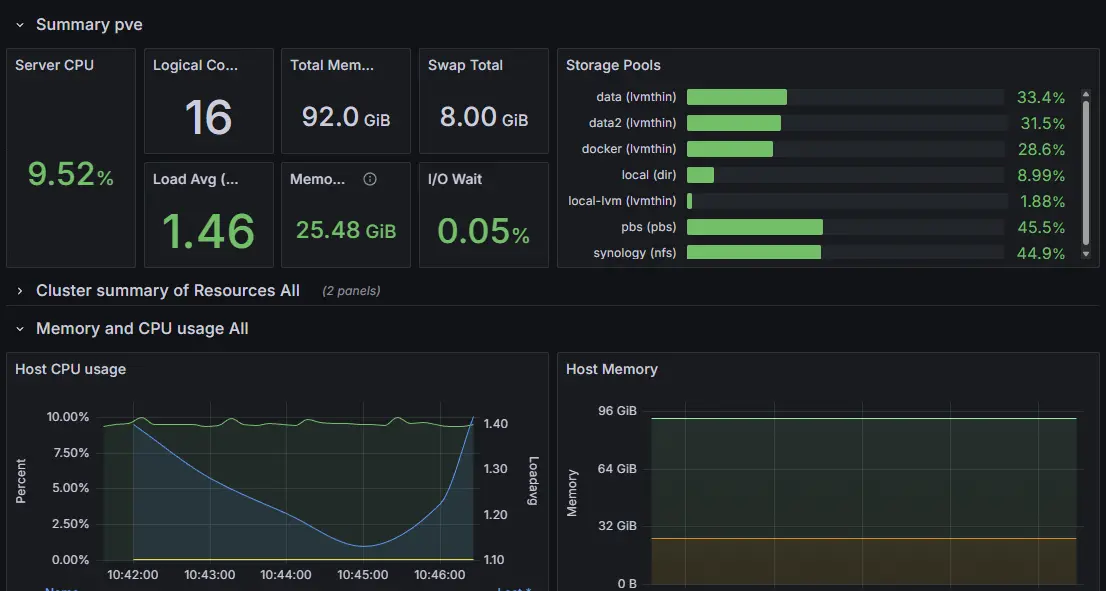
The next feature of Proxmox that I wanted to look into was a way to track virtual machine metrics. The Proxmox webui provides limited stats about the virtual machines and does not keep historical data. It does provide a built in way to send metrics to a metric server, such as InfluxDB or OpenTelemetry. I chose to use InfluxDB because I had already had it setup. It only took me about 10 minutes to connect Proxmox to InfluxDB and the InfluxDB to Grafana. Afterwards, I had a nice dashboard that display several stats and could provide historical data. You can tell InfluxDB to keep your data for as long as you want when you create the storage bucket, but I went with 30 days.
Then I wanted a way to passthrough a GPU so that I could use it on a virtual machine running Ollama. The actual passthrough of the device was easy enough. You just go to Resource Mappings under the Datacenter view of the Proxmox webui and add a PCI Device. The more difficult part at first was figuring out how to download the Nvidia driver and get them to work correctly. After figuring out how to blacklist the default Nvidia drivers and download the correct ones, everything was up and running. Then a few weeks later, I made the mistake of using apt to update and upgrade everything, including the Nvidia drivers. This caused a mismatch in the driver and the library version. A had to force remove everything related to Nvidia and start over at that point. After this fiasco, I made sure to hold Nvidia driver version in apt.